Set different preparation times for specific time slots
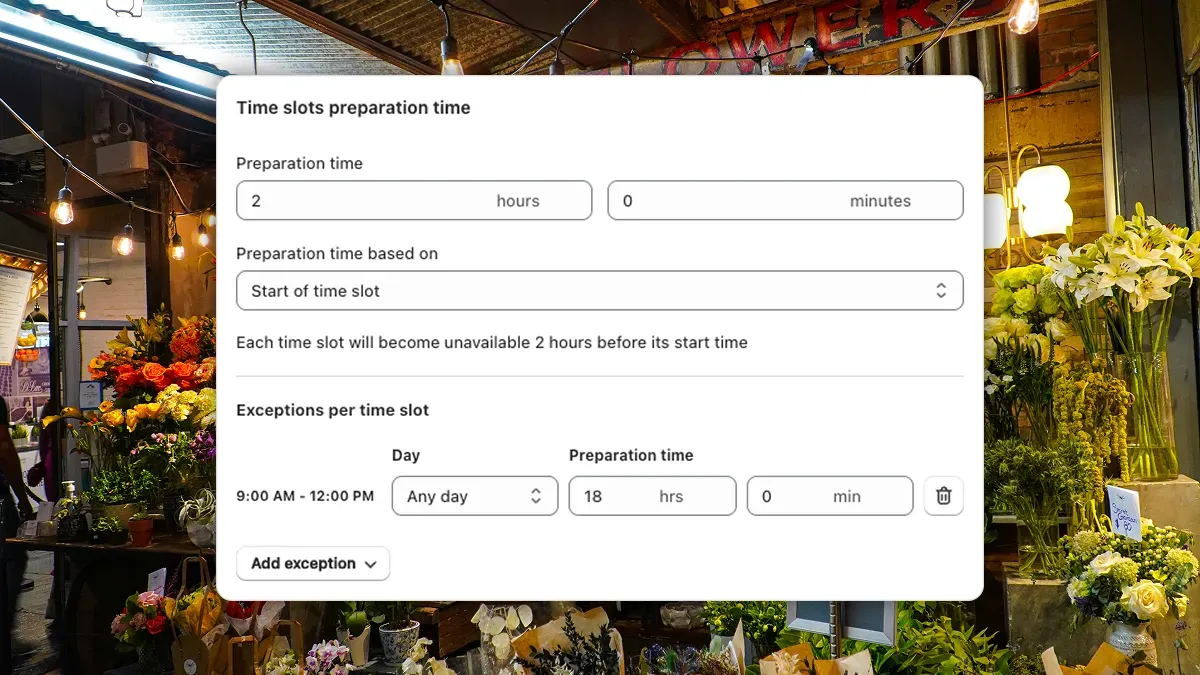
You set a preparation time so customers can’t order too close to their delivery slot. But what about that first slot of the day - the one that catches you off guard when someone orders at 11 PM the night before?
Preparation time exceptions let you set different lead times for specific time slots, so you can require more notice exactly where you need it.
How it works
Your base preparation time still applies to all time slots as a default. Exceptions let you override it for specific ones.
For example, say your store closes at 9 PM and your first delivery slot the next morning is 9 AM - 10 AM. With a standard 2-hour preparation time, a customer ordering at 10 PM would see that morning slot as available - even though your team won’t be there to prepare it until the morning.
With an exception, you can set the 9 AM - 10 AM slot to require 18 hours of lead time. Now that late-night order won’t show the early morning slot, and your team isn’t scrambling when they open up.
Setting it up
- Go to your Time slots settings
- Under Preparation time, find the Exceptions section
- Add an exception - choose the time slot, the day(s) it applies to, and the lead time in hours
You can add as many exceptions as you need, each targeting a different time slot and day combination.
For the full guide, check out our documentation.