Orders you take by phone can now have a delivery date too

Not every order comes through your online store. A regular calls to order a birthday cake, a company emails about flowers for their reception, a couple settles the details of their wedding cake in person. For these orders, you create a draft order in Shopify and send the invoice or take the payment.
Now those orders can carry their delivery or pickup date too, and land in Buunto right next to your online orders.
This was one of our most requested features, especially from bakeries and florists who take a lot of orders by phone.
Set the date on the draft order
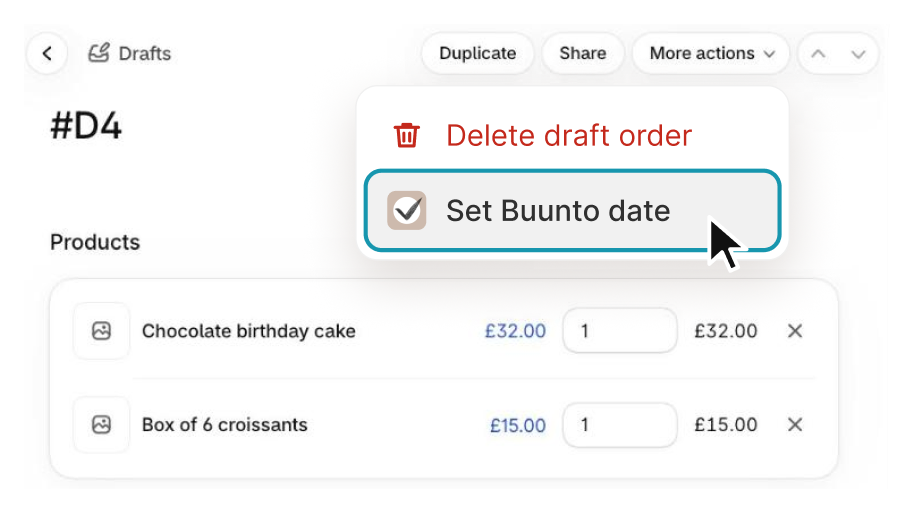
You can now set the Buunto date right from the draft order. Open More actions > Set Buunto date.
Then choose the location, the date and the time slot, and save.
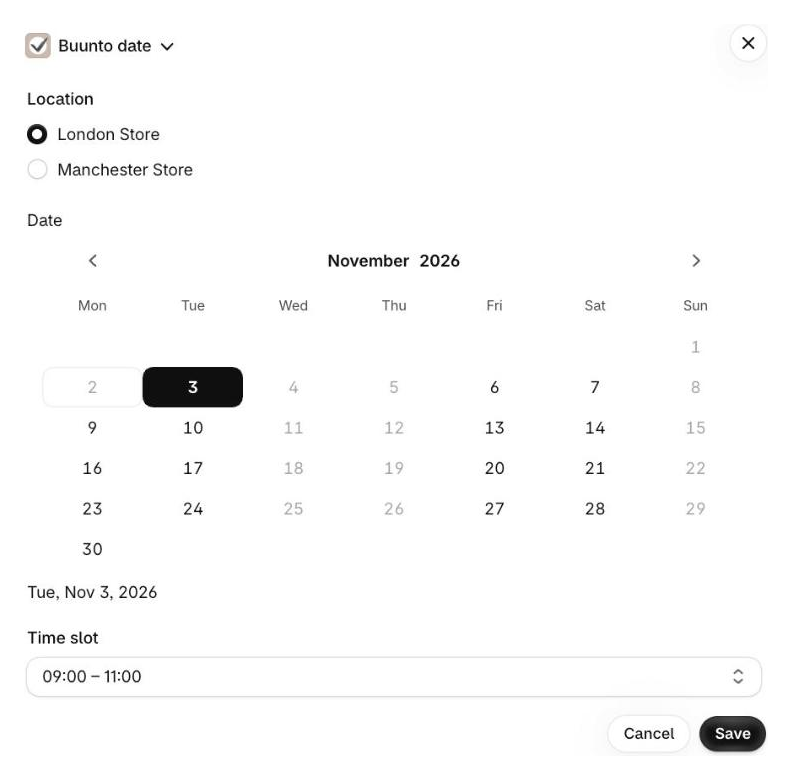
The dates follow the same rules as your online store: cut-off times, preparation time, closed days and order limits. So the date you promise over the phone is one you can actually deliver.
The order arrives like any other
Once the date is saved, it appears on the draft order. Send the invoice or take the payment as usual. Your customer pays without being asked for a date again, and the order lands in your Buunto calendar and order list with its date, time slot and location, tagged just like your online orders.
Added another product after setting the date? Open Set Buunto date again and Buunto tells you if that product needs a time slot or a different day, before your customer pays.
Get started
Buunto needs one extra permission to update your draft orders. Open Buunto from your Shopify admin and approve it when asked.
Then follow our draft orders guide for the full steps, along with a few things to know when you take payment.